Midea R290 Troubleshooting Guide (black controller)
If you require emergency hot water please follow this guide here
Midea R32 Troubleshooting Guide
1. Is the controller on?
- If not, check your fusebox to ensure the breaker is up.
- Also check the red isolator switch next to your outdoor heat pump – this must be switched ON.
2. Is there an error message on the controller?
-
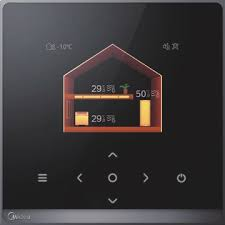
Faults usually show on the main screen in the top right .
- On Midea systems, the most common error codes are E0, E7 or E8.
- A full error list is included at the bottom of this guide.
Here is how to access your heat pump error history:
1. Press & Hold < & > simultaneously for 1.5 seconds to unlock the controller
2. Press Menu (three lines on the Left)
3. Navigate to Error History , using the arrows
- Press the circle button when highlighted


3. Is the water pressure OK?
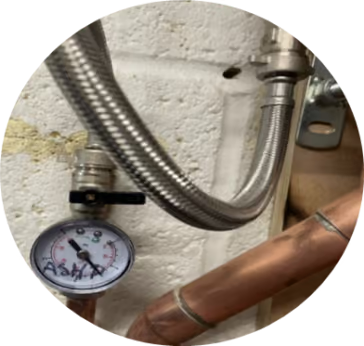
- The system pressure should be between 1.0 – 1.5 bar.
Topping up system pressure:
- Locate the filling loop – usually next to your hot water cylinder. It consists of a braided pipe with a black-handled valve on each end.
- Fully open one black tap so it follows the direction of the pipe.
- Slowly open the second valve and watch the pressure gauge rise.
- When the pressure is at 1.0 – 1.5 bar, close both valves.
➡️ If your pressure is already correct, move on to System Reset.
4. Perform a system reset
- Switch power OFF at the breaker (consumer unit) or the red isolator by the heat pump.
- Wait 60 seconds.
- Switch the power back ON.
- Allow the heat pump up to 30 minutes to try running in heating or hot water mode.
- If you still see an E0 error after following the steps above, please email us at support@energize.uk.com.
5. Ensure hot water is active
Sometimes the hot water can be disabled by mistake
- On the controller, check the tank symbol on the right-hand side:
- If it is grey the hot water is OFF
- If it is orange the hot water is ON
To activate/deactivate hot water:
- Long press the Unlock button.
- Press & Hold < & > simultaneously for 1.5 seconds to unlock the controller
- press the right button so the hot water tank and temperature is highlighted
- Press the On/Off button. (far right) so the tank turns orange
Emergency Hot Water
If the system won’t run and you need hot water urgently:
➡️ Follow our Emergency Hot Water Guide to turn on your immersion heater as backup.
7️⃣ Still Not Working?
If your heat pump still won’t operate after these checks:
- Take a photo of the error code and controller screen.
- Note your system pressure.
- Confirm you’ve tried restarting the system.
📩 Send this information to support@energize.uk.com so we can help quickly.
✅ Quick Summary
- Check power supply (fuseboard & isolators).
- Check system pressure (1.0–1.5 bar).
- Reset and note error codes.
- Use immersion heater if urgent.
- Contact support with photos/details if unresolved. support@energize.uk.com
If you require emergency hot water please follow this guide here
👉 Still having issues? Please contact our support team:
Common Midea Error Codes
- E8: Water flow error
- Triggered when the system does not detect water flow after the circulation pump activates.
- This code usually self-resets and can be caused by an air lock.
- If it appears repeatedly, check system pressure and filters.
- E0: Water flow error (persistent)
- Often caused by low pressure or a blocked filter.
- Will not self-reset – follow the steps above to clear.
- E7: Some units require a software update