Generic Heat Pump Troubleshooting
If you require emergency hot water please follow this guide here
🔧 Generic Heat Pump Troubleshooting Guide
If your heat pump has stopped providing heating or hot water, follow these steps before calling for support. Many issues can be solved with a simple check or reset.
1️⃣ Check for Power
- Is the controller or heat pump display lit up?
- If the screen is blank, the system may not be receiving power.
-
Check your fuseboard and any local isolator switches near the indoor and outdoor units — make sure they are ON.
Check your thermostat.
- Make sure it’s turned on and set to HEAT mode.
- The set temperature should be higher than the current room temperature.
- Most thermostats show a flame icon 🔥 or “heating” indicator when they are calling for heat.
- If there’s no heating demand shown, the system won’t start — try increasing the set temperature by a few degrees and see if the flame symbol appears.
2️⃣ Check System Pressure
Most heat pumps need water pressure between 1.0 – 1.5 bar.
- Look at the pressure gauge (usually on or near the cylinder).
- If it’s below 0.5 bar, the system may need topping up.
-
Top up your system pressure:
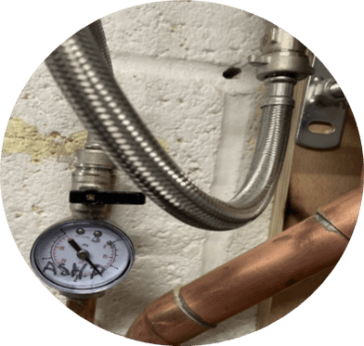
You will first need to locate your filling loop, it is usually next to your hot water cylinder. Filling loops consist of a braided pipe with a black-handle valve on either end, as shown in the image.
1. Fully open one of the black taps so that it is following the direction of the pipe
2. Slowly start to open the second valve
3. Notice the pressure increasing
4. Close both valves once adequately filled.
If your system pressure is already between 1 – 1.5 bar, please proceed to System Reset.
3️⃣ Look for Error Codes
- Does the controller screen show any error codes or warnings?
- Note these down or take a photo.
- Error codes often point to issues like low pressure, flow problems, or sensor faults.
4️⃣ Restart the System
A simple reset often clears temporary issues:
- Turn OFF the AC isolator (red switch by the outdoor unit).
- Wait 2–3 minutes.
- Turn back ON.
- Allow 5–10 minutes for the system to restart.
5️⃣ Is Hot Water Urgent?
If the heat pump still won’t run and you urgently need hot water:
➡️ Use your immersion heater backup — see Emergency Hot Water Guide.
6️⃣ Still Not Working?
If the steps above don’t restore heating or hot water:
- Take a photo of the controller screen (including any error codes).
- Note your system pressure reading.
- Confirm you’ve tried restarting the system.
📩 Contact us at support@energize.uk.com with this information so we can help quickly.
✅ Summary
- Check power supply and system pressure.
- Note error codes or warnings.
- Restart the system.
- Use immersion for emergency hot water.
- Contact support with photos and details if the issue continues.
If you require emergency hot water please follow this guide here