Midea R32 Troubleshooting guide
If you require emergency hot water please follow this guide here
Midea R32 Troubleshooting Guide (white controller)
Check for Power
Is the controller or heat pump display lit up?
- If the screen is blank, the system may not be receiving power.
- Check your fuseboard and any local isolator switches near the indoor and outdoor units — make sure they are ON.
Check your thermostat.
- Make sure it’s turned on and set to HEAT mode.
- The set temperature should be higher than the current room temperature.
- Most thermostats show a flame icon 🔥 or “heating” indicator when they are calling for heat.
- If there’s no heating demand shown, the system won’t start — try increasing the set temperature by a few degrees and see if the flame symbol appears.
2. Is there an error message on the controller?

- Faults usually show on the main screen .
- On Midea systems, the most common error codes are E0 or E8.
- A full error list is included at the bottom of this guide.
Accessing the error history:
- Long press the Unlock button.
- Press Menu.
- Navigate to Service Information.
- Move across to Error Code to see stored faults.

3. Is the water pressure OK?
- The system pressure should be between 1.0 – 1.5 bar.
Topping up system pressure:
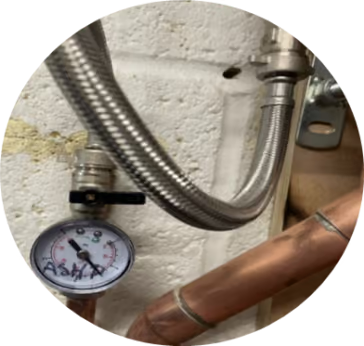
- Locate the filling loop – usually next to your hot water cylinder. It consists of a braided pipe with a black-handled valve on each end.
- Fully open one black tap so it follows the direction of the pipe.
- Slowly open the second valve and watch the pressure gauge rise.
- When the pressure is at 1.0 – 1.5 bar, close both valves.
➡️ If your pressure is already correct, move on to System Reset.
4. Perform a system reset
- Switch power OFF at the breaker (consumer unit) or the red isolator by the heat pump.
- Wait 60 seconds.
- Switch the power back ON.
- Allow the heat pump up to 30 minutes to try running in heating or hot water mode.
- If you still see an E0 error after following the steps above, please email us at support@energize.uk.com.
5. Ensure hot water is active
Sometimes the hot water can be disabled by mistake
- On the controller, check the tap symbol on the right-hand side:
- If it has 3 heat lines, hot water is ON.
- If there are no lines, hot water is OFF.
To activate/deactivate hot water:
- Long press the Unlock button.
- Navigate right to highlight the hot water temperature.
- Press the On/Off button.

Emergency Hot Water
If the system won’t run and you need hot water urgently:
➡️ Follow our Emergency Hot Water Guide to turn on your immersion heater as backup.
7️⃣ Still Not Working?
If your heat pump still won’t operate after these checks:
- Take a photo of the error code and controller screen.
- Note your system pressure.
- Confirm you’ve tried restarting the system.
📩 Send this information to support@energize.uk.com so we can help quickly.
✅ Quick Summary
- Check power supply (fuseboard & isolators).
- Check system pressure (1.0–1.5 bar).
- Reset and note error codes.
- Use immersion heater if urgent.
- Contact support with photos/details if unresolved. support@energize.uk.com
If you require emergency hot water please follow this guide here
👉 Still having issues? Please contact our support team: support@energize.uk.com
Common Midea Error Codes
- E8: Water flow error
- Triggered when the system does not detect water flow after the circulation pump activates.
- This code usually self-resets and can be caused by an air lock.
- If it appears repeatedly, check system pressure and filters.
- E0: Water flow error (persistent)
- Often caused by low pressure or a blocked filter.
- Will not self-reset – follow the steps above to clear.