Midea R32 Controller Guide
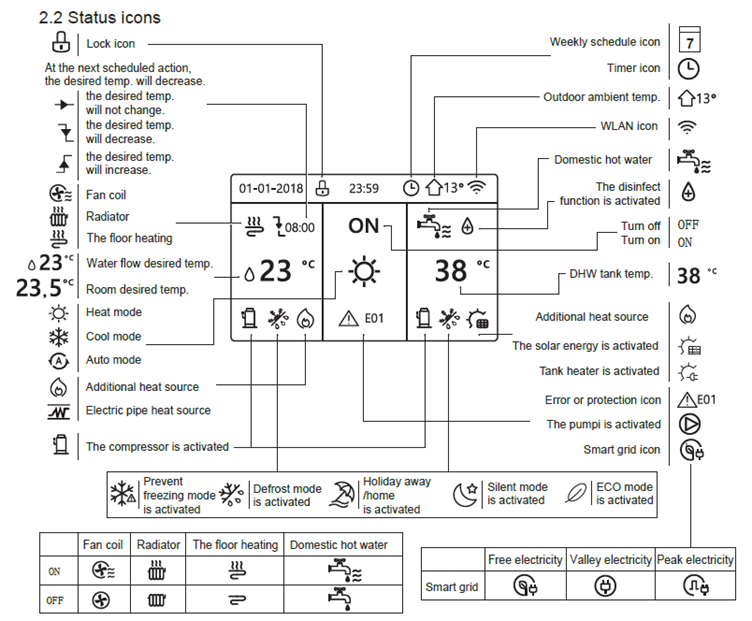
What do the symbols on my Midea controller mean?
How can I change my hot water Temperature?
If you find your hot water is consistently hotter than you’d like, you can easily adjust the domestic hot water (DHW) set point by following these simple steps:
1. Press and hold the Unlock button.
2. Press the Right ( > ) arrow to highlight the DHW temperature.
3. Use the Up and Down arrows to adjust the temperature.
Note: We typically set the DHW temperature to 48°C as standard.
How can I change the time?
1. Long press the Unlock button
2. Press Menu
3. Navigate down to Service Information
4. Navigate across to Display
5. Navigate down to Time, and adjust accordingly
6. Press OK to confirm the new time
7. Press Back to return to the home screen
How can I schedule the hot water?
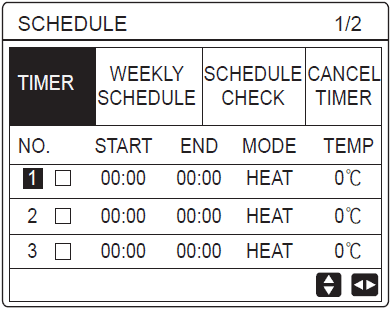
1. Unlock the Midea controller by pressing & holding Unlock
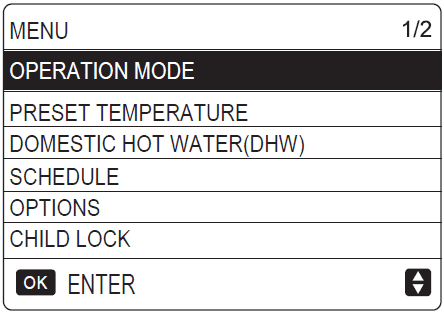
2.Select the Menu button on the Midea Controller
3. Navigate to Schedule and press Confirm
4. Activate Timer No.1 & 2
5. Navigate across to highlight Start/End/Mode/Temp, using the Up & Down arrows to adjust.
6. Adjust settings for Timer No.1
Start Time = 05:00
End Time = 09:00
Mode = DHW
Temp = 53°
7. Adjust settings for Timer No.2 and enter the following details.
Start Time = 13:00
End Time = 14:00
Mode = DHW
Temp = 47°