Midea R290 Controller Guide
What do the symbols on my Midea R290 controller mean?
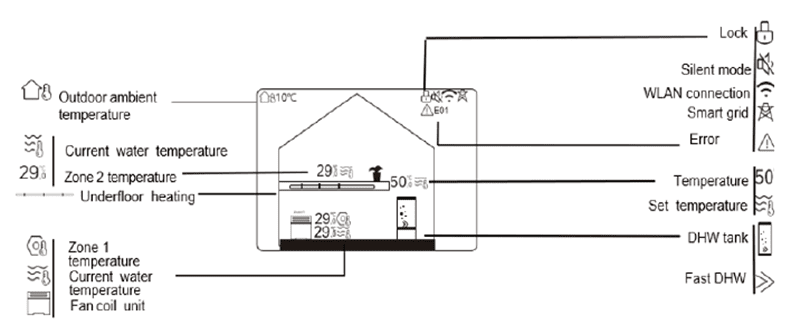
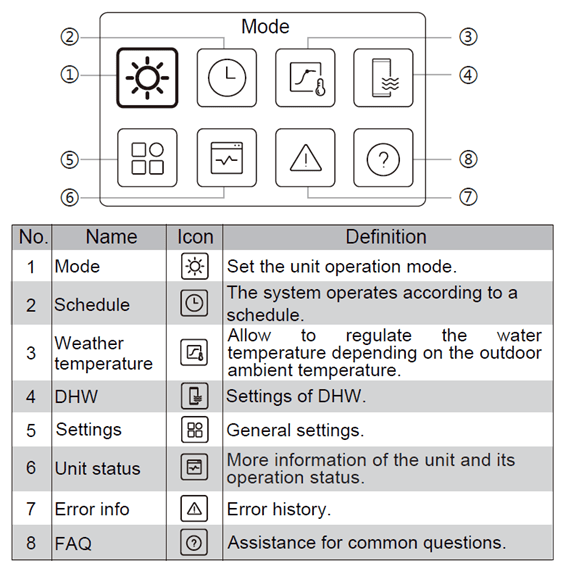
How do I adjust the Date/Time on my Midea R290 controller?
1. Press & Hold < & > simultaneously for 1.5 seconds to unlock the controller
2. Press Menu
3. Navigate to Settings
4. Navigate to Display Settings
5. Adjust Date/Time as necessary
6. Press Menu for 2 seconds to return to the home screen
How do I schedule my hot water?
Instructions for setting up a hot water schedule can be found here.
How can I change the hot water temperature?
If your hot water feels consistently hotter than you’d like, you can adjust the domestic hot water (DHW) set point by following these steps:
1. Press & Hold < & > simultaneously for 1.5 seconds to unlock the controller
2. Highlight the DHW temperature
3. Use the Up and Down arrows to adjust the temperature
Note: We typically set the DHW temperature to 48°C as standard