Tado Thermostat Help
How do I schedule my heating with a Tado?
Heat pumps operate most efficiently when running at a steady, low output over extended periods – commonly referred to as running “low and slow.” Maintaining a consistent thermostat setting allows the system to work at this optimal level, enhancing overall energy efficiency.
For this reason, we advise against scheduling temperature setbacks of more than 2°C below your usual set point, as larger drops can reduce efficiency and require more energy to bring the home back up to temperature. This might mean a steady temperature of 19 degrees during the day and 17 overnight or while you are away from home for the day.
The Tado support page has detailed instructions to help you to create your weekly heating schedule.
Can I use my Tado to control my hot water?
Control of your hot water is not possible with the Tado controller. Full control is managed by the heat pump controller.
Where can I see what my Tado system has been doing?
You can view a history of your Tado system’s heating activity by accessing the Climate Report within your Tado app.
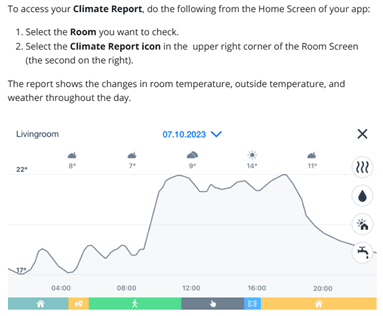
The Climate Report also highlights any connectivity issues with the wireless temperature sensor (thermostat). If the graph shows a loss of connection, we recommend reaching out to Tado support for further assistance.
Should I use the open window detection & geofencing features?
Open Window detection is designed to put your heat pump into set back mode if it detects a door or a window has been left open. We do not recommend using the open window detection feature on Tado. It is highly sensitive and can react to doors or windows being opened briefly, which may cause unnecessary cycling of your heat pump.
The geofencing feature can be useful if configured correctly. We recommend setting a wider geofence area to avoid the system turning on or off when you’re just stepping into the garden or near your home. Here’s how to set up geofencing for apple and android devices.
What should I do if the wireless temperature sensor (thermostat) keeps losing connection?
If your Climate Report shows that the wireless temperature sensor (thermostat) is frequently losing connection, relocating the Tado Internet Bridge can help resolve the issue.
For newer versions (Tado X) you may need to recconect to the wifi
How do I contact Tado support?
- On that Tado app, navigate to More at the bottom of the screen
- Select Support
- Select Messages
- Select Send us a message
- Select I have a technical question
Can you contact Tado support on my behalf?
Tado no longer allows installers to contact their support team on behalf of customers. As a result, our ability to assist with Tado-related issues is limited.
If you suspect there is a problem with any of your Tado devices, we recommend reaching out to Tado support directly for the most effective assistance.
Tado support sites:

